
Nibbly
Nibbly
Nibbly
End-to-end app design focused on
helping diners find quick and easy
access to restaurant menus that fit
their diets and busy schedules.
End-to-end app design focused on helping diners find quick and easy access to restaurant menus that fit their diets and busy schedules.
End-to-end app design focused on helping diners find quick and easy access to restaurant menus that fit their diets and busy schedules.
Role
Role
Role
Researcher, Product Designer
Researcher, Product Designer
Researcher, Product Designer
Skills
Skills
Skills
User Research, Wireframing, Prototyping,
Usability Testing
User Research, Wireframing, Prototyping, Usability Testing
User Research, Wireframing,
Prototyping, Usability Testing
Tools
Tools
Tools
Figma
Figma
Figma
Timeline
Timeline
Timeline
November - December 2026; 6 weeks
November - December 2026; 6 weeks
November - December 2026;
6 weeks
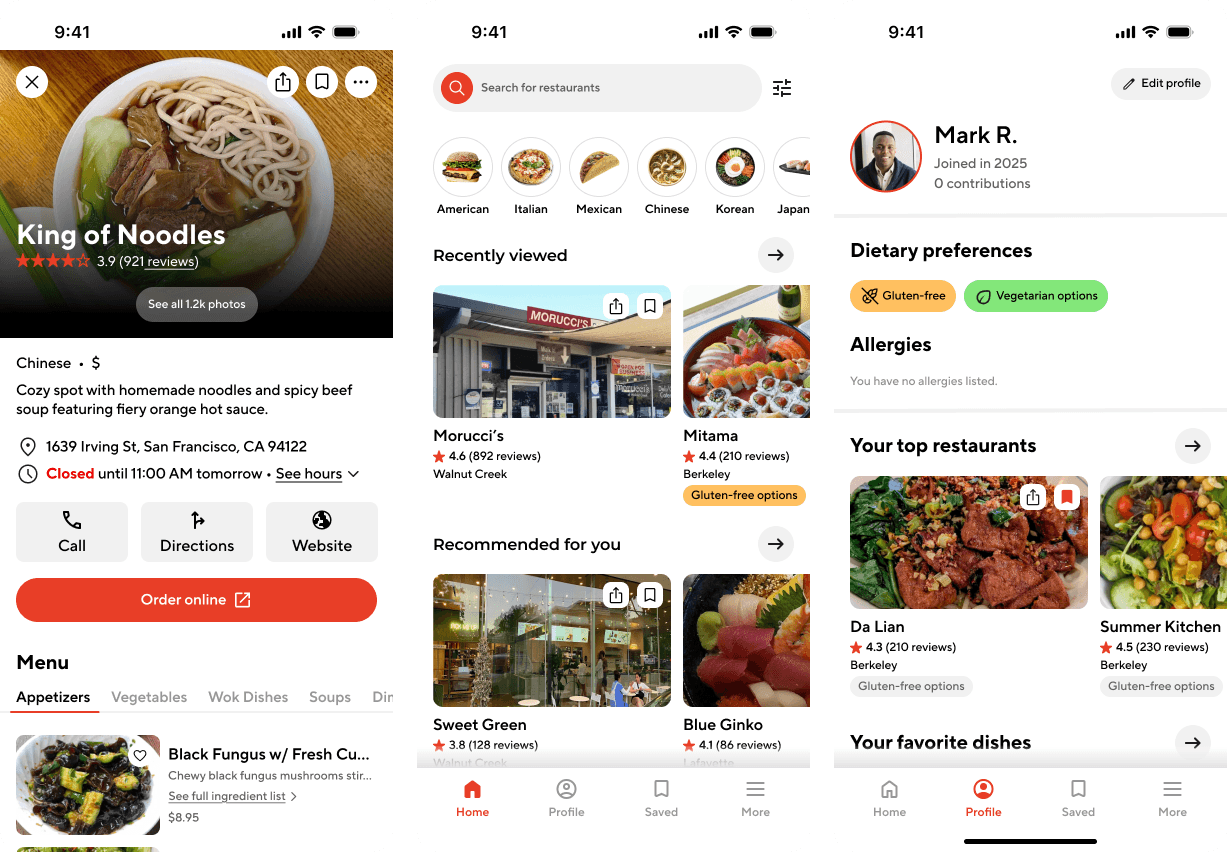
BACKGROUND & PROBLEM STATEMENT
BACKGROUND & PROBLEM STATEMENT
Finding a restaurant menu online is often a frustrating and time-consuming task. Information can be scattered across outdated websites, user-uploaded photos may show up blurry, and multiple third-party platforms prioritize reviews over menu clarity. For users with dietary restrictions, budget limits, or specific preferences, this lack of accessibility becomes an even bigger barrier to making quick, informed dining choices. I saw this project as an opportunity to improve how people search for menus by providing a consistent and reliable platform that alleviates the struggle of searching for where and what to eat.
Finding a restaurant menu online is often a frustrating and time-consuming task. Information can be scattered across outdated websites, user-uploaded photos may show up blurry, and multiple third-party platforms prioritize reviews over menu clarity. For users with dietary restrictions, budget limits, or specific preferences, this lack of accessibility becomes an even bigger barrier to making quick, informed dining choices. I saw this project as an opportunity to improve how people search for menus by providing a consistent and reliable platform that alleviates the struggle of searching for where and what to eat.
EXPLORATION
EXPLORATION
When thinking about what problem I wanted to solve with an app, I thought about the commonly-experienced frustration of finally choosing a restaurant only to encounter the issue of their online menu being outdated, out of season, or unreliable. I then thought about how much more frustrating this experience must be for those with dietary restrictions or allergies, as they are left unsure as to whether a restaurant offers dishes that can accommodate their diet. At the same time, many small and family-owned restaurants lack the resources or infrastructure to maintain a strong online presence. Designing a platform for menu discovery could not only ease decision-making for diners but also provide smaller restaurants with a simple way to present their menus online and thus reach a wider customer base. With these thoughts in mind, I posed the main challenge as:
How might we create a platform that enables those on a busy schedule or people with specific dietary restrictions to feel more confident in where they eat while reducing unnecessary frustration and wasted time?
When thinking about what problem I wanted to solve with an app, I thought about the commonly-experienced frustration of finally choosing a restaurant only to encounter the issue of their online menu being outdated, out of season, or unreliable. I then thought about how much more frustrating this experience must be for those with dietary restrictions or allergies, as they are left unsure as to whether a restaurant offers dishes that can accommodate their diet. At the same time, many small and family-owned restaurants lack the resources or infrastructure to maintain a strong online presence. Designing a platform for menu discovery could not only ease decision-making for diners but also provide smaller restaurants with a simple way to present their menus online and thus reach a wider customer base. With these thoughts in mind, I posed the main challenge as:
How might we create a platform that enables those on a busy schedule or people with specific dietary restrictions to feel more confident in where they eat while reducing unnecessary frustration and wasted time?
RESEARCH APPROACH
RESEARCH APPROACH
Identifying the main obstacles and upfront frustrations that users face when attempting to locate restaurant information online took main priority. To better understand how to find the ideal solution, 3 different methodologies for user research were selected to uncover the information needed to inform decision making.:
Preliminary Research
Preliminary Research
This included evaluating current apps and platforms that provide similar services and conducting a SWOT analysis. This early exploration emphasized where existing solutions fall short and in what ways a dedicated menu-focused platform like Nibbly could be needed.
This included evaluating current apps and platforms that provide similar services and conducting a SWOT analysis. This early exploration emphasized where existing solutions fall short and in what ways a dedicated menu-focused platform like Nibbly could be needed.
User Interviews
User Interviews
To understand real user behaviors, I conducted interviews with individuals both with and without dietary restrictions. The interviews provided deeper qualitative insights into user frustrations and decision-making processes.
To understand real user behaviors, I conducted interviews with individuals both with and without dietary restrictions. The interviews provided deeper qualitative insights into user frustrations and decision-making processes.
User Surveys
User Surveys
I also sent out user surveys to participants who could not be interviewed. These concise questionnaires captured patterns in how users discover menus, the frequency of common obstacles, and the importance of clear menu information when choosing where to eat.
I also sent out user surveys to participants who could not be interviewed. These concise questionnaires captured patterns in how users discover menus, the frequency of common obstacles, and the importance of clear menu information when choosing where to eat.
RESEARCH FINDINGS
RESEARCH FINDINGS
User interviews and surveys revealed the following key insights:
User interviews and surveys revealed the following key insights:
Users rely on Google, but information is often unreliable
Users rely on Google, but information is often unreliable
Most participants reported using Google as their primary method for finding restaurant menus and online reviews. However, many described encountering outdated menus, incorrect pricing, or incomplete information across different websites.
Most participants reported using Google as their primary method for finding restaurant menus and online reviews. However, many described encountering outdated menus, incorrect pricing, or incomplete information across different websites.
Visuals play a key role in decision-making
Visuals play a key role in decision-making
Users expressed a strong preference for seeing photos of menu items before ordering. Images help them estimate portion sizes, understand how dishes are presented, and avoid surprises when food looks different from their expectations. Visual context ultimately helps users feel more confident in their choices.
Users expressed a strong preference for seeing photos of menu items before ordering. Images help them estimate portion sizes, understand how dishes are presented, and avoid surprises when food looks different from their expectations. Visual context ultimately helps users feel more confident in their choices.
Users want to plan ahead before visiting restaurants
Users want to plan ahead before visiting restaurants
Looking up menus is not limited to online ordering scenarios. Many users prefer reviewing menus ahead of time when planning to dine in, allowing them to quickly decide what to order once they arrive. Being prepared reduces decision time and makes the overall dining experience feel smoother.
Looking up menus is not limited to online ordering scenarios. Many users prefer reviewing menus ahead of time when planning to dine in, allowing them to quickly decide what to order once they arrive. Being prepared reduces decision time and makes the overall dining experience feel smoother.
Early exploratory research showed that users most frequently rely on platforms like Google, Yelp, Reddit, and Tripadvisor when searching for restaurant menus and reviews.
Early exploratory research showed that users most frequently rely on platforms like Google, Yelp, Reddit, and Tripadvisor when searching for restaurant menus and reviews.
I conducted a SWOT analysis between these platforms to identify the ways in which they each met user needs as well as areas that could be improved.
I conducted a SWOT analysis between these platforms to identify the ways in which they each met user needs as well as areas that could be improved.



Strengths
Strengths
Platforms like Google and Yelp have extremely large user bases and are both regularly used when searching for restaurants and restaurant information. Reddit and Tripadvisor can be used for more specific searches depending on what is needed.
Platforms like Google and Yelp have extremely large user bases and are both regularly used when searching for restaurants and restaurant information. Reddit and Tripadvisor can be used for more specific searches depending on what is needed.
Weaknesses
Weaknesses
Google and Yelp don't prioritize menu information or smaller, independent restaurants. Reddit and Tripadvisor are heavily influenced by user input and can therefore vary in their reliability.
Google and Yelp don't prioritize menu information or smaller, independent restaurants. Reddit and Tripadvisor are heavily influenced by user input and can therefore vary in their reliability.
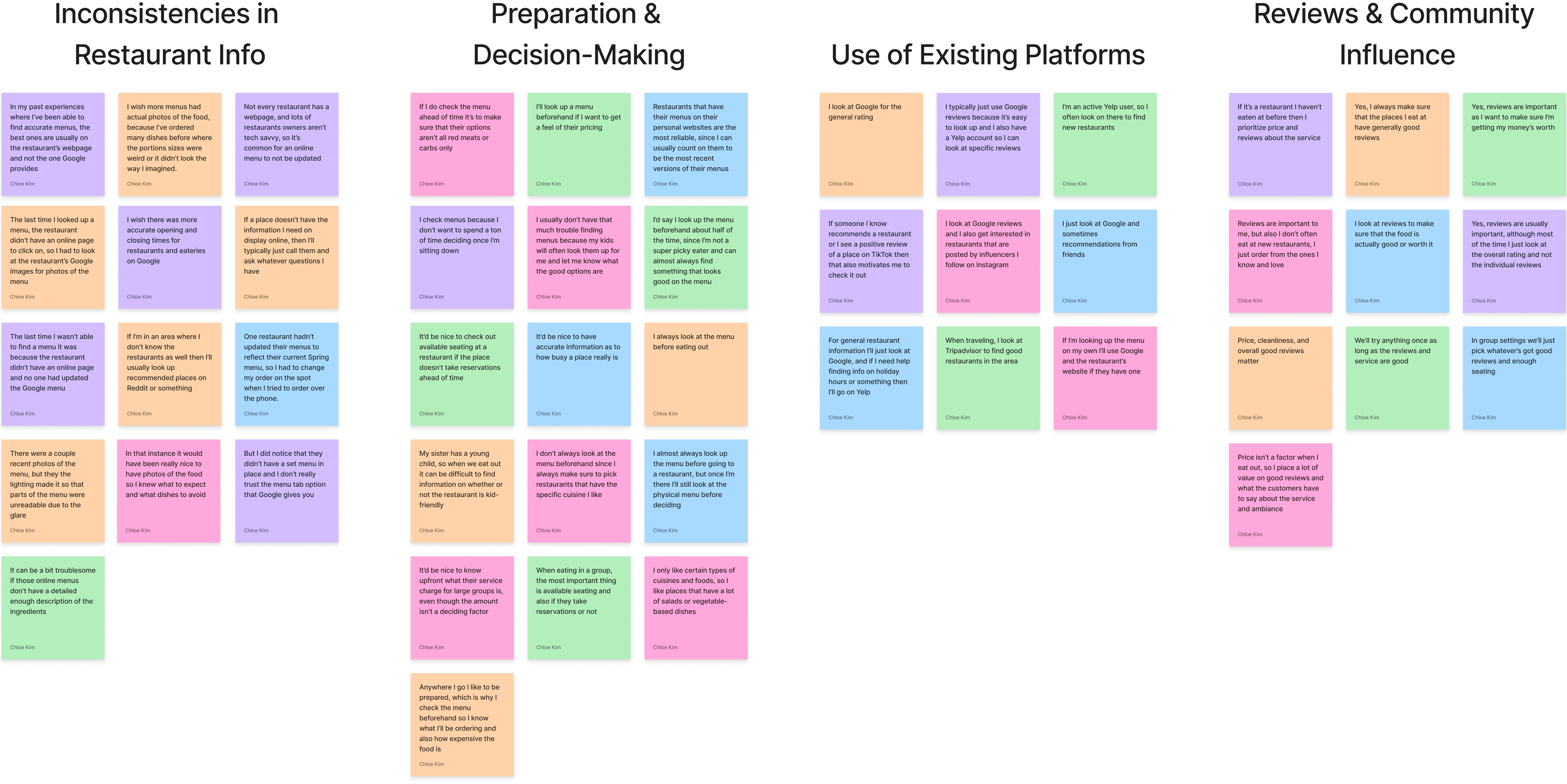
Using quotes and user experiences gathered from the interviews and surveys, I created an affinity map to guide my findings into design priorities.
Using quotes and user experiences gathered from the interviews and surveys, I created an affinity map to guide my findings into design priorities.
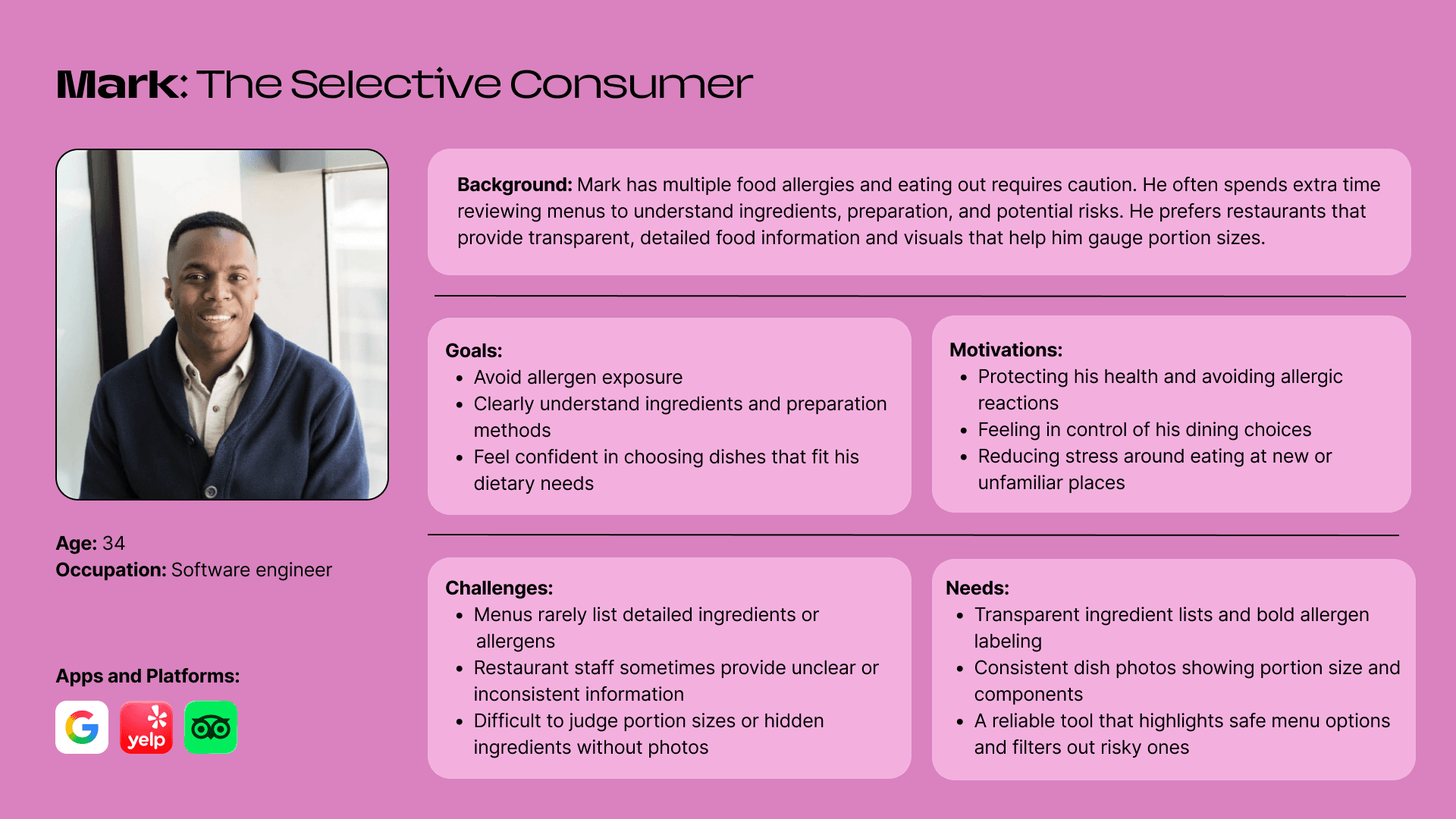
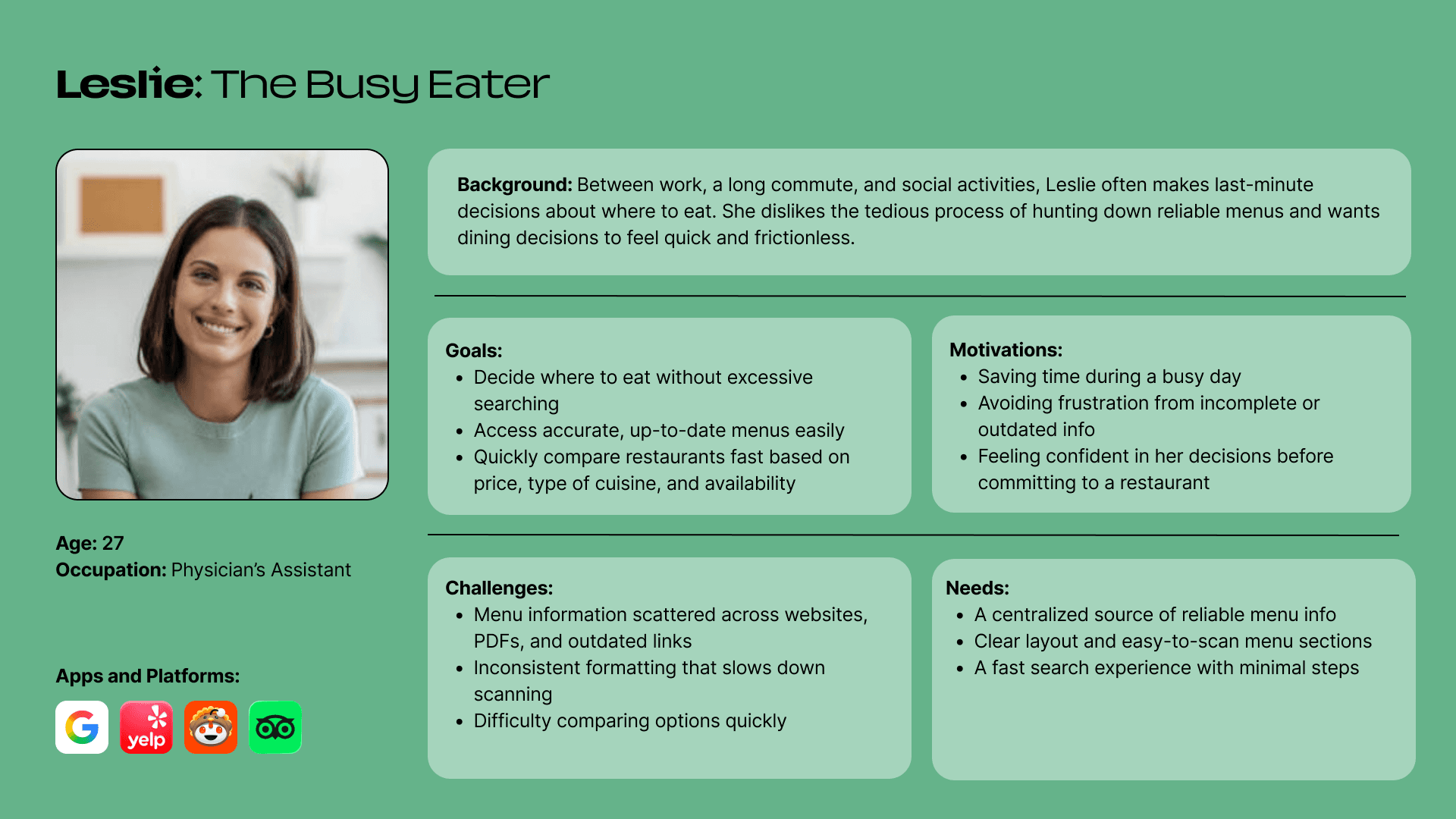
These priorities helped shape the two user personas that I would be referencing throughout my design process:
These priorities helped shape the two user personas that I would be referencing throughout my design process:
PRIORITIZATION & MAPPING
PRIORITIZATION & MAPPING
With my research complete, the next step was to begin laying down the foundation of the app's features and user flow.
With my research complete, the next step was to begin laying down the foundation of the app's features and user flow.
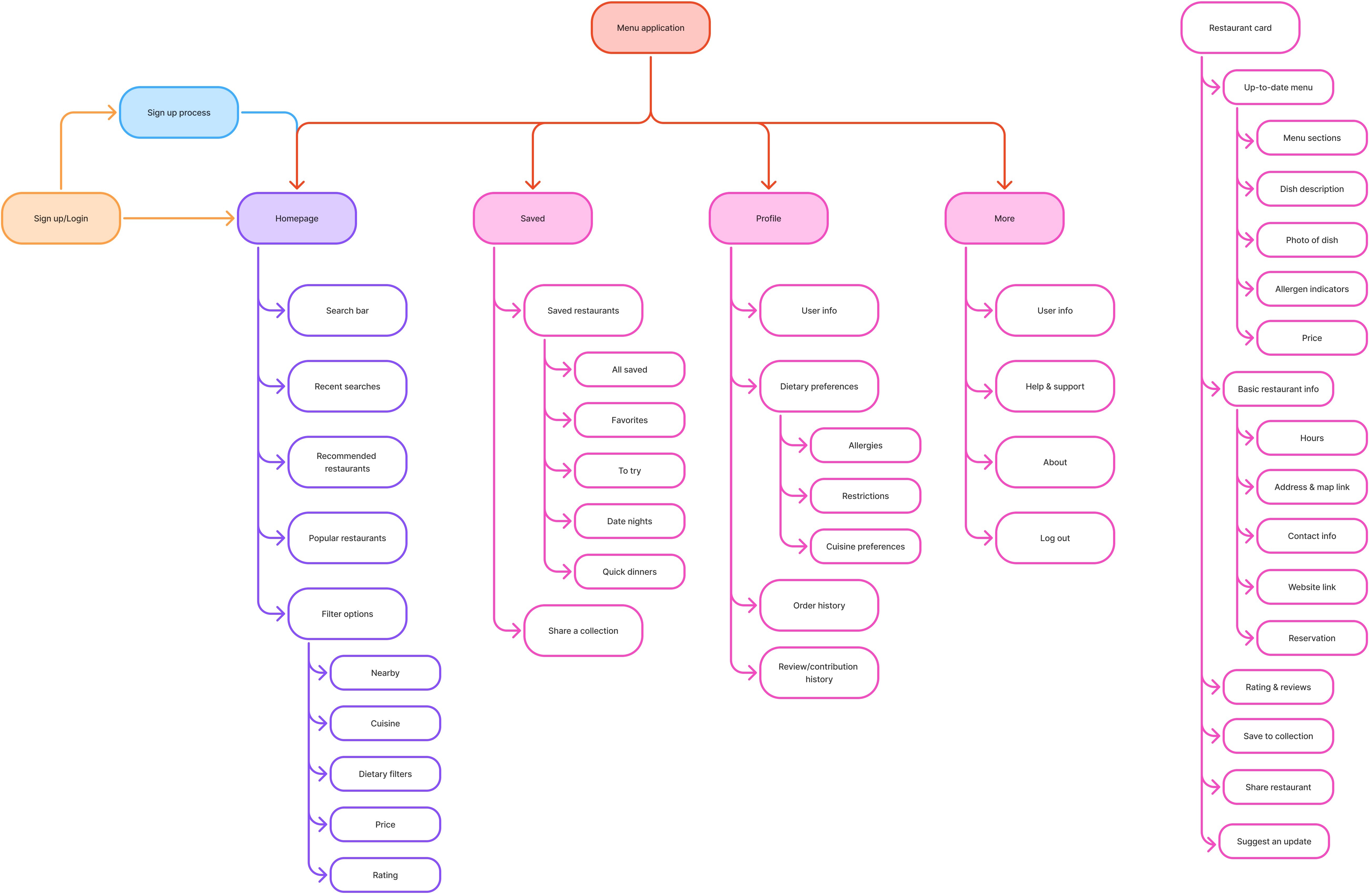
The sitemap below showcases the primary pages of the app and what each page contains. Because Nibbly brings together a wide range of features alongside an extensive database of restaurants and menus, the system quickly becomes structurally complex. To manage this, it was crucial to visualize not just individual screens, but how each page, its features, and their connections work together as a cohesive whole. The sitemap served as a foundational tool in clarifying this architecture and guiding intuitive user flows.
The sitemap below showcases the primary pages of the app and what each page contains. Because Nibbly brings together a wide range of features alongside an extensive database of restaurants and menus, the system quickly becomes structurally complex. To manage this, it was crucial to visualize not just individual screens, but how each page, its features, and their connections work together as a cohesive whole. The sitemap served as a foundational tool in clarifying this architecture and guiding intuitive user flows.
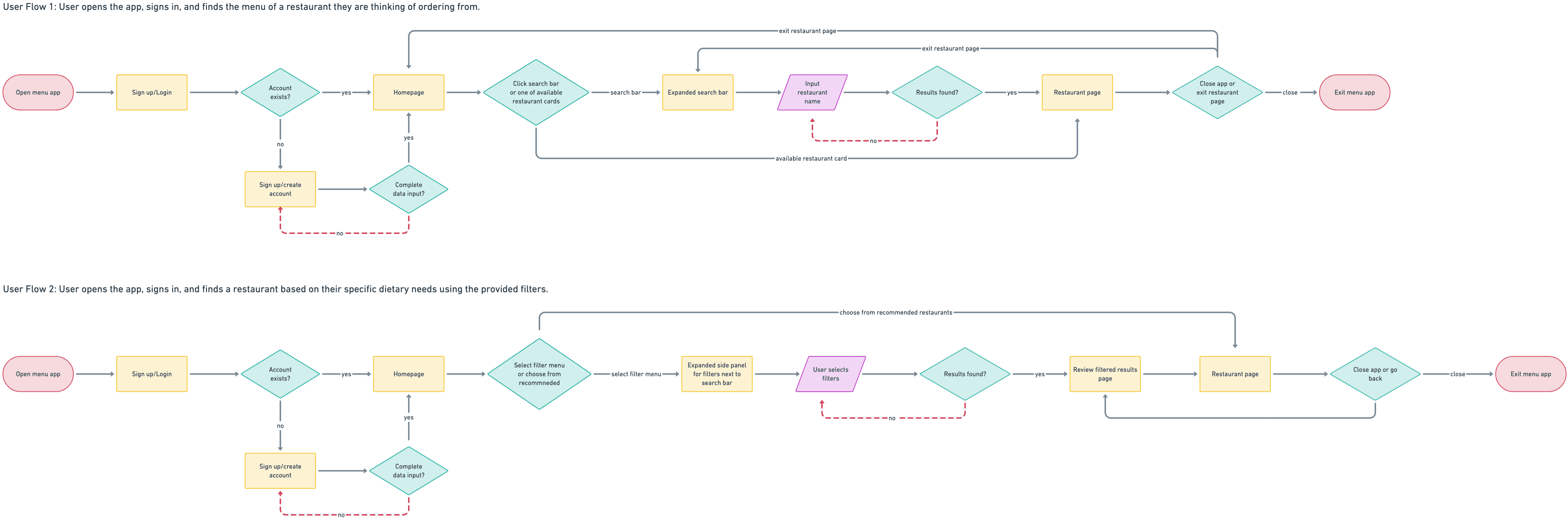
Based on the sitemap, I then created two user flows that illustrate potential journeys users may take when navigating the app. This step ensured that interactions felt efficient and aligned with user expectations. Creating these flows also revealed potential friction points early on so that I could re-evaluate how to make the experience more cohesive.
Based on the sitemap, I then created two user flows that illustrate potential journeys users may take when navigating the app. This step ensured that interactions felt efficient and aligned with user expectations. Creating these flows also revealed potential friction points early on so that I could re-evaluate how to make the experience more cohesive.
IDEATION
IDEATION
On to the low-fidelity screens!
On to the low-fidelity screens!
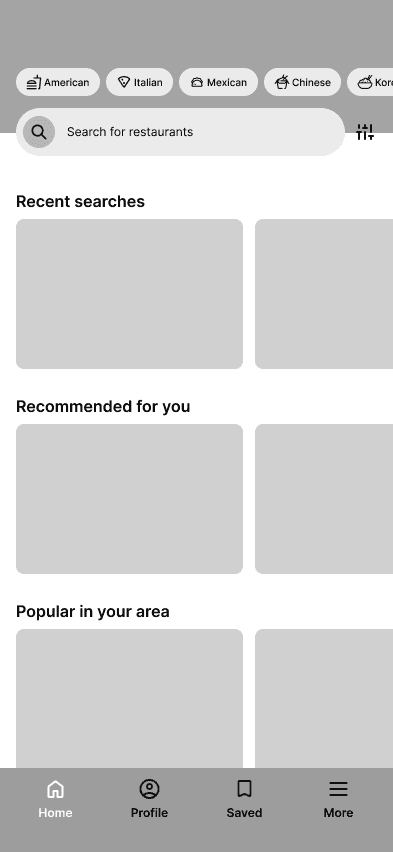
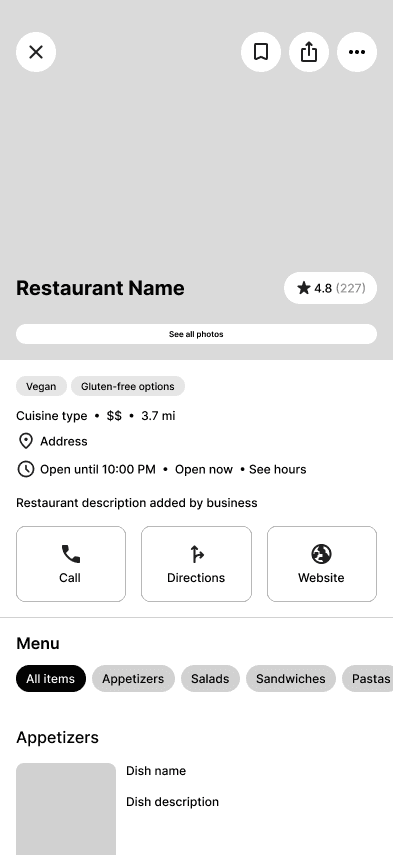
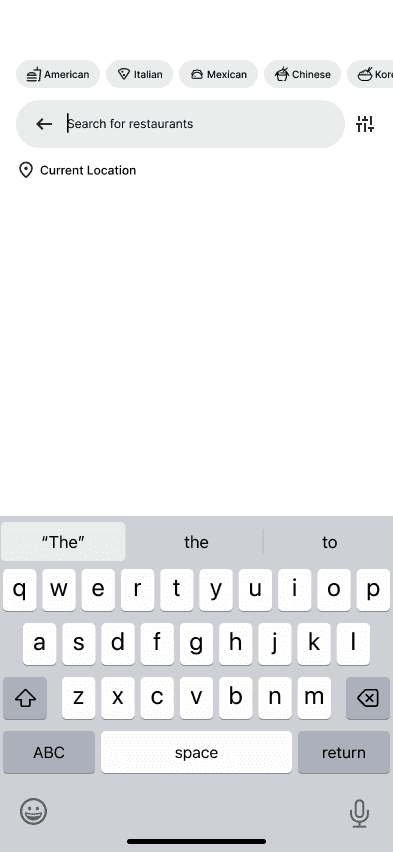
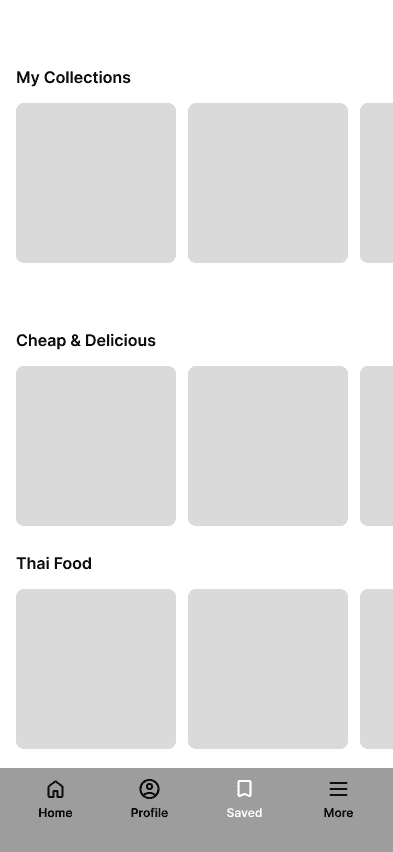
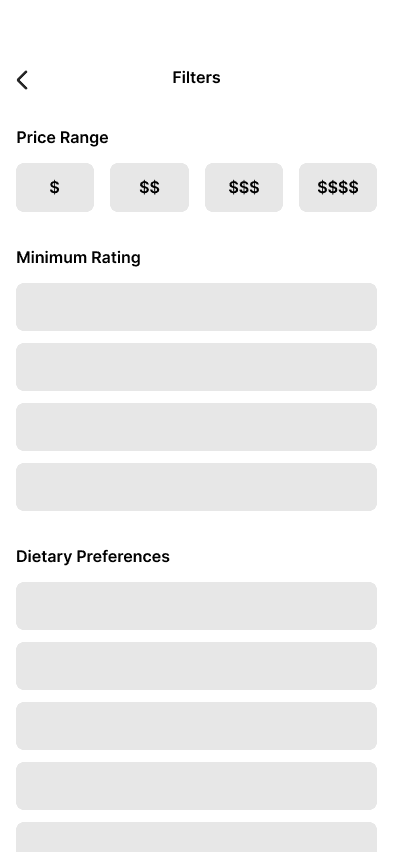
I began this ideation phase by creating a series of low-fidelity wireframes that translated my sitemap into tangible screens. These preliminary layouts helped map out the core structure of the app and determine how key features would be distributed across different pages. By visualizing the interface at an early stage, I was able to organize functionality, explore layout options, and establish a clear foundation for the app’s user experience before moving into higher-fidelity design.
I began this ideation phase by creating a series of low-fidelity wireframes that translated my sitemap into tangible screens. These preliminary layouts helped map out the core structure of the app and determine how key features would be distributed across different pages. By visualizing the interface at an early stage, I was able to organize functionality, explore layout options, and establish a clear foundation for the app’s user experience before moving into higher-fidelity design.
FINAL DESIGNS
FINAL DESIGNS
Enable location to find restaurants nearby.
Enable location to find restaurants nearby.
Before browsing restaurants, users can enable location services so Nibbly can suggest nearby dining options. This step ensures recommendations are relevant and tailored to where the user is.
Before browsing restaurants, users can enable location services so Nibbly can suggest nearby dining options. This step ensures recommendations are relevant and tailored to where the user is.
Find your next favorite spot.
Find your next favorite spot.
Nibbly's homepage showcases recently viewed, recommended, and popular restaurants. From there, they can quickly select a restaurant that catches their interest and dive deeper into its offerings.
Nibbly's homepage showcases recently viewed, recommended, and popular restaurants. From there, they can quickly select a restaurant that catches their interest and dive deeper into its offerings.
Want to know what's in a dish?
Want to know what's in a dish?
By clicking on a item under a restaurant's menu, users can view a detailed description of the dish and the ingredients within it.
By clicking on a item under a restaurant's menu, users can view a detailed description of the dish and the ingredients within it.
Filter based on your needs and preferences.
Filter based on your needs and preferences.
Users can tap the search bar or filter button to narrow down options using dietary preferences, price range, and other criteria. These tools make it easy to cut through the noise and find exactly what they’re looking for.
Users can tap the search bar or filter button to narrow down options using dietary preferences, price range, and other criteria. These tools make it easy to cut through the noise and find exactly what they’re looking for.
Save your faves for later.
Save your faves for later.
When a restaurant stands out, users can save it for future reference. Saved restaurants are stored in a dedicated page, making it simple to revisit favorites or plan the next meal.
When a restaurant stands out, users can save it for future reference. Saved restaurants are stored in a dedicated page, making it simple to revisit favorites or plan the next meal.
TESTING & ITERATIONS
TESTING & ITERATIONS
Usability testing helped assess how users navigated the core flows and interacted with key features.
These sessions revealed a few opportunities to refine the experience and ensure the app aligned with users’ expectations when deciding where to eat.
Usability testing helped assess how users navigated the core flows and interacted with key features.
These sessions revealed a few opportunities to refine the experience and ensure the app aligned with users’ expectations when deciding where to eat.
Adding an option to order online.
Adding an option to order online.
Two primary revisions emerged from this testing. First, I introduced an “Order online” button within restaurant pages. This allows users to seamlessly transition from browsing to ordering by redirecting them to the restaurant’s preferred ordering platform, whether that be a third-party service like DoorDash or the restaurant’s own website.
Two primary revisions emerged from this testing. First, I introduced an “Order online” button within restaurant pages. This allows users to seamlessly transition from browsing to ordering by redirecting them to the restaurant’s preferred ordering platform, whether that be a third-party service like DoorDash or the restaurant’s own website.
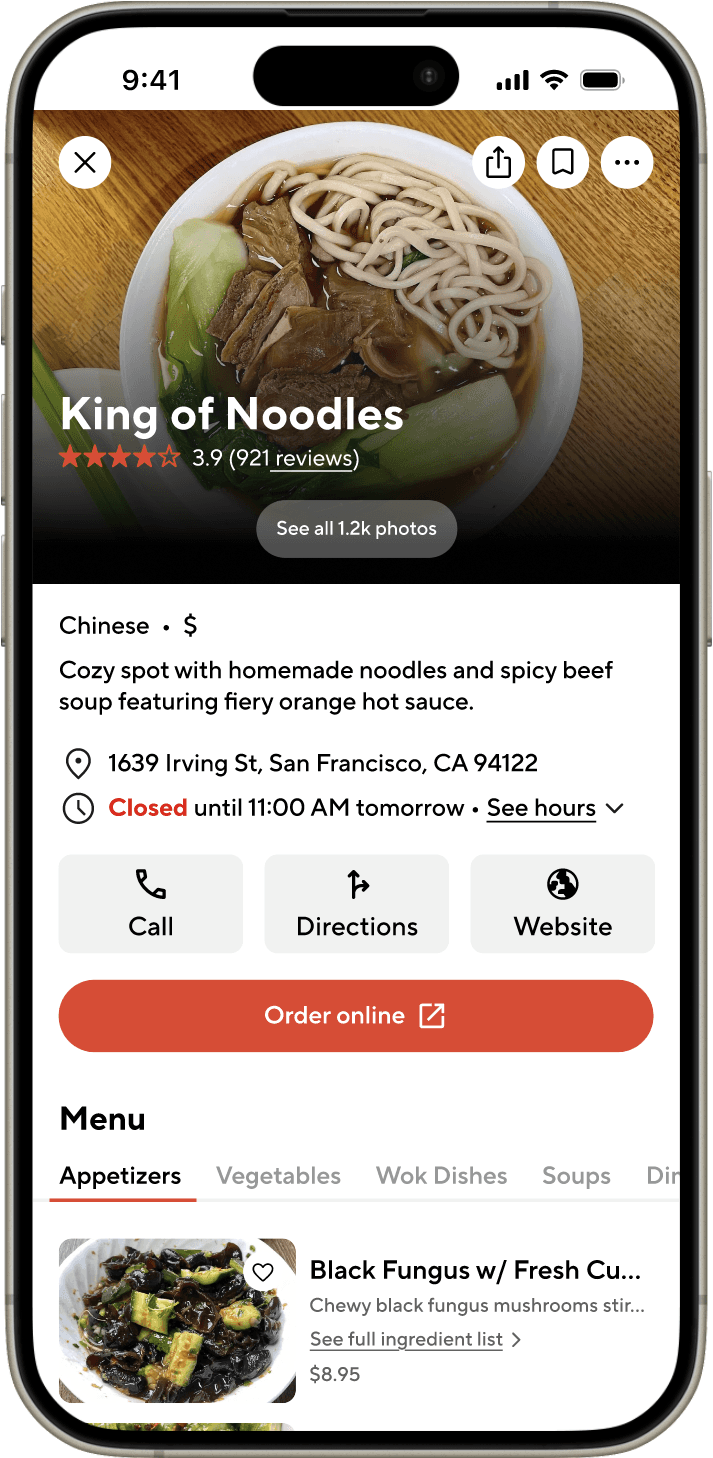
Second, I incorporated more color throughout the interface to strengthen Nibbly’s visual identity and create a more lively, engaging atmosphere. While the initial designs were intentionally minimal, adding color helped reinforce branding and made the experience feel more dynamic and inviting.
Second, I incorporated more color throughout the interface to strengthen Nibbly’s visual identity and create a more lively, engaging atmosphere. While the initial designs were intentionally minimal, adding color helped reinforce branding and made the experience feel more dynamic and inviting.
LEARNINGS
LEARNINGS
Because there exist such a wide variety of food-based apps on the market, I was able to explore the aspects of these apps that made them so appealing to users and learned how to apply them to my own designs. Furthermore, this project taught me that designing for a specific target audience has the potential to create a solution that benefits a wider selection of users.
Because there exist such a wide variety of food-based apps on the market, I was able to explore the aspects of these apps that made them so appealing to users and learned how to apply them to my own designs. Furthermore, this project taught me that designing for a specific target audience has the potential to create a solution that benefits a wider selection of users.
< Previous project
< Previous project
< Previous project
Next project >
Next project >
Next project >